
Monitor
Continuous monitoring
Your connection, your office network and the cloud services you use every day, monitored from inside each site. If something starts to go wrong, you will know.
How it worksNetwork forensics & monitoring
Vigilatum monitors the network at each of your sites and, when something fails, tells you what has happened, whose problem it is – your network, your internet provider or the service – and what to do. And it keeps the evidence of every incident so that you can prove it.
What we do
Three tools that are usually separate – one that monitors, one that diagnoses and one that keeps the evidence – in a single platform, designed for businesses without a networking department.
Monitor
Your connection, your office network and the cloud services you use every day, monitored from inside each site. If something starts to go wrong, you will know.
How it worksUnderstand
We tell you whether the problem is in your network, with your internet provider or in the service, and what to do. In plain language, with a single alert per incident.
How it worksProve
Every incident is documented and sealed: when it started, how long it lasted and where the failure was. Ready for your complaint.
Network forensicsOur strength
A monitoring tool alerts you that something has gone down and, once it recovers, there is nothing left to show. Vigilatum keeps what happened at that moment, sealed, so that your IT technician can fix it sooner and you can prove it afterwards.
When it started, when the alert went out and when it recovered, to the second.
In your network, with your internet provider or in the service, with what proves it.
Saved at the time: what you present is exactly what was recorded.
For your internet provider, your service provider, your insurer or your management.
Beyond monitoring
Monitoring tells you that something has stopped responding. Vigilatum tells you what has happened, where and why – and proves it.
What almost any tool gives you
Network monitoring, diagnosis and forensics
The product
Dashboard
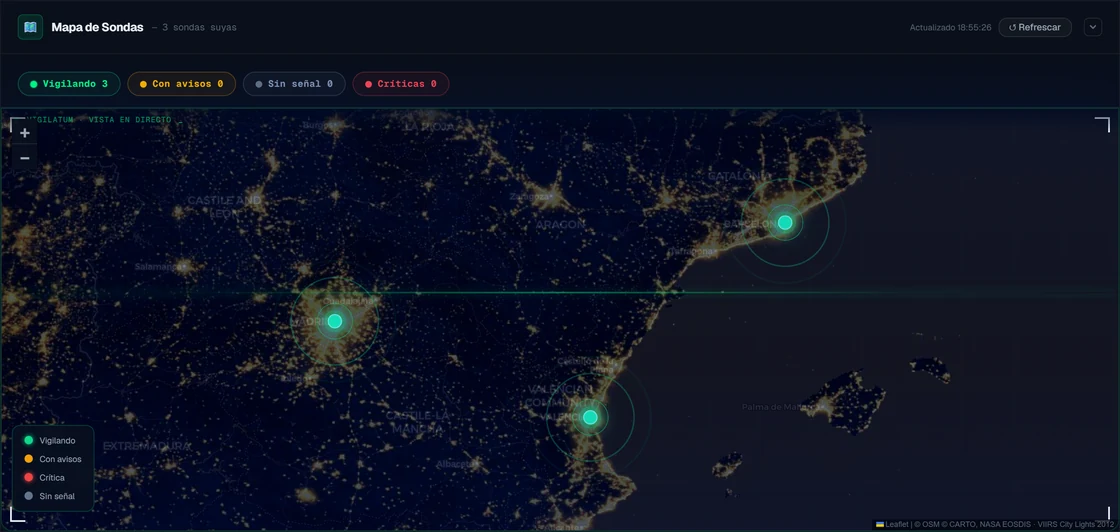
Each office appears in the colour of its status. If something fails, you know at which site, since when and why, without calling anyone.
Alerts
No error codes. The alert says what has happened, why and what to do, and marks what is down to you, what is for your IT technician and what needs to be taken up with the provider.

Reports
Availability, incidents, how long each one lasted and whose fault it was, per site or for all of them. For your management, your IT technician or your internet provider.

Getting started
We send you the installer and an activation code. Within a few minutes it is monitoring, without touching the router or opening ports.
The probe monitors your network and your services continuously, day and night. You do not have to do anything.
If something fails, you receive the alert with the cause and the steps to follow, and the incident record is saved.
Solutions
Each sector depends on different services. Vigilatum monitors yours and knows what it means when they fail.
Cloud medical records, appointment booking and video consultations: know in time whether the failure lies with the clinic or with the provider.
View solutionE-prescriptions and the card terminal cannot wait. An alert with the cause as soon as they stop responding.
View solutionEmail, the court portal and cloud documents, with evidence of every outage in case you need to prove it.
View solutionE-government portals, certificates and online banking on deadline days, with a history of every failure.
View solutionCard terminal, till and online orders: what failed and how long it lasted, so you can complain with data.
View solutionOne probe per office, all on the same dashboard, with common failures in a single alert.
View solutionSecurity and privacy
Trust is the precondition for installing a probe. This is how we handle it. More about security
The probe only sends information to our servers. It never accepts connections from outside.
Hosted in data centres in the European Union and encrypted in transit.
Data processing agreement ready to sign. We monitor how your network responds, not what you send.
Each piece of data is kept only for as long as strictly necessary. When you cancel, it is deleted.
Frequently asked questions
Monitoring tells you that something has stopped responding. Vigilatum confirms the failure, tells you where it is – in your network, with your internet provider or in the service – and keeps the evidence of every incident, sealed, so that you can make a complaint. It is the difference between an alert and an incident record.
No. We send you the installer and an activation code: you run it on an office computer, paste the code and the probe starts monitoring. There is no need to touch the router or open ports.
Less than a minute from the start of the fault, and without bothering you over a mere blip on the line. The alert appears on your dashboard with the cause and the steps to follow.
That is not what we do: we monitor how your network responds, not what you send or receive. When a fault is confirmed, a brief technical record of that moment is kept so that it can be proven, and it expires shortly afterwards. The exact periods are set out in the privacy policy.
Yes. A probe is installed at each site and they all appear on the same dashboard, with the status of each one and common failures in a single alert.
59 € per month per probe – one per site – with two human support tickets a month included. No setup fee, no minimum term and a free pilot before you pay anything. See pricing
A free pilot with a probe on your real network, with no card and no commitment. We will reply within 24 working hours.